









Custom LCD Screens | Size, Resolution, and Interface Customization
Custom LCD screens available in sizes from 1.44 to 12 inches, with resolutions ranging from 128x64 to 2560x1440.
Supports SPI/I2C/RGB/MIPI interfaces and ST7735/ILI9488 drivers.
Provide your specifications to the manufacturer for quick prototyping and adaptation within 7 days.
Size
Micro <3" (e.g., 0.96" used for Fitbit Sense 2 blood oxygen monitoring, power consumption <50mW), Small 3-7" (e.g., 7" like iPad mini for document display, 1080p resolution), Medium 8-15" (e.g., 10.1" Siemens HMI controls industrial equipment, power consumption 5W), Large >15" .
Non-standard sizes increase mold costs by 300%, power consumption rises 20% per inch, need to select precisely according to scenario.
Usage Requirements
First see what you want to do with it
Users divide into three scenario categories:
-
Display only numbers/short text (e.g., thermometer, electric meter):
A micro screen (<3 inches) is enough. Example: Fluke 117 digital multimeter uses 1.4-inch monochrome LCD, displays voltage/current values, character height 5mm (visible with glasses), power consumption <30mW, lasts 2 years on two AA batteries.
-
View charts/multiple windows:
Requires medium screen (8-15 inches) + suitable resolution. Example: Siemens SIMATIC HMI KTP1200 uses 12-inch screen, 1280×800 resolution, can simultaneously open 4 windows displaying device temperature, speed, alarm logs, touch response time 8ms (Siemens technical manual). If resolution is too low (e.g., 800×480), chart lines become blurry.
-
View HD video/fine images:
Large screen (>15 inches) + high resolution. Example: Eizo RadiForce RX1270 medical display uses 21.3-inch screen, 2560×2048 resolution (5MP), grayscale levels 1024 (complying with DICOM Part 14 standard), doctors can see 0.1mm micro nodules on CT scans.
The screen must withstand where you use it
Common environmental requirements are of three types:
|
Environment Type
|
Key Parameters
|
Case
|
Data Details
|
|---|---|---|---|
|
Outdoor strong light
|
Brightness ≥1000nits, anti-glare coating
|
BMW iX center console screen (14.9 inches)
|
Peak brightness 1200nits, surface AG coating reflectivity <2% (BMW 2023 model manual)
|
|
Industrial workshop
|
Operating temperature -20℃~70℃, oil-proof
|
Honeywell HC900 controller (10.4-inch screen)
|
Wide-temperature liquid crystal material, starts at -20℃ without ghosting, IP65 protection (dust/waterproof) (Honeywell industrial solution)
|
|
Lab precision measurement
|
Low electromagnetic interference (EMI), no flicker
|
Keysight DSOX1204G oscilloscope (8.5-inch screen)
|
Screen flicker frequency 120Hz, EMI radiation <30dBμV/m (Keysight EMC test)
|
How to touch it most conveniently with fingers
Common user preferences:
-
Single-point touch (simple menu selection): Use resistive screen, low cost. Example: Trimble Geo 7X handheld GPS uses 3.5-inch resistive screen, can be tapped with gloves, positioning accuracy ±2cm.
-
Multi-touch (zoom/drawing): Must use capacitive screen, fast response. Example: Apple iPad Pro (12.9 inches) uses ProMotion adaptive refresh rate screen, 10-finger touch latency <10ms, lines follow hand when drawing CAD.
-
No touch at all (remote viewing): Choose low-power non-touch screen. Example: Ring Stick Up Cam indoor camera uses 2.4-inch non-touch screen, only displays connection status and battery, power consumption <100mW.
How long can the battery last
Screen power consumption is directly linked to size and brightness:
-
Micro screen (<3 inches): Power consumption <50mW. Example: Garmin Fenix 7 outdoor sports watch uses 1.3-inch screen, always-on display mode consumes 45mW, solar charging supplements, outdoor running 10 hours battery drop <10%.
-
Small screen (3-7 inches): Power consumption 1-3W. Example: GoPro Hero 11 action camera uses 2.27-inch screen, screen power consumption 2.2W when recording 4K video, battery capacity 1720mAh, can record 2.5 hours.
-
Large screen (>15 inches): Power consumption 30-100W. Example: NEC MultiSync V554 commercial ad player uses 55-inch screen, daily playback power consumption 80W, on 12 hours per day, monthly electricity cost about 5 (U.S. electricity price 0.15/kWh).
Does it tire the eyes?
Users who look at screens for long periods (e.g., programmers, designers) pay attention to these parameters:
-
Brightness adjustable range: At least 50-500nits. Example: Dell U2723QE monitor uses 27-inch screen, brightness from 50nits (night) to 400nits (day), ΔE <2 (small color deviation), reduces eye fatigue by 30% after 8 hours continuous viewing (Dell ergonomic report).
-
Blue light filtering: Choose with low blue light mode (e.g., TÜV certified). Example: BenQ GW2480 office monitor uses 23.8-inch screen, low blue light mode reduces harmful blue light (415-455nm) proportion to <20% (TÜV Rheinland certification data).
-
Contrast ratio: Static contrast ratio ≥1000:1. Example: LG UltraFine 32UN880-B uses 32-inch 4K screen, contrast ratio 1300:1, dark detail (e.g., night photos) shows 30% more than screen with 500:1 contrast (RTINGS review).
Selection Method
First clarify where you plan to use this screen
The screen's location directly limits the maximum size, divided into two situations:
-
Pocket/carried in one hand (portable devices):
Size must be small, otherwise can't hold and wastes power. Example: Zebra MC3300 handheld PDA uses 5-inch screen (diagonal 127mm), whole device weight 270g (including battery), thumb can reach any corner of screen when held in one hand (Zebra ergonomic test). If changed to 7-inch screen, weight would soar to 350g, hand fatigue after holding for 1 hour.
Then look at battery life: 5-inch screen power consumption 1.5W, with 4000mAh battery lasts 8 hours; 7-inch screen power consumption 2.2W, same battery only lasts 5 hours.
-
Mounted on wall/embedded in console (fixed equipment):
Size depends on installation space and viewing distance. Example: Honeywell Experion PKS industrial control system, console embeds 15-inch screen (diagonal 381mm), operator sits 60cm away viewing, screen occupies 30° of field of view (complies with ISO 9241 visual comfort standard). If installing 24-inch screen, 60cm distance makes field of view occupation exceed 50%, easily causing eye strain.
Display content determines how much space you need
The more and finer the content displayed on the screen, the larger the size needs to be. Look at three types of content specifically:
|
Content Type
|
Minimum Recommended Size
|
Case
|
Data Details
|
|---|---|---|---|
|
Single line text/numbers
|
<3 inches
|
Fluke 117 multimeter (1.4" screen)
|
Display "12.5V" character height 5mm, visible with glasses (Fluke spec)
|
|
Multiple lines text + simple icons
|
3-5 inches
|
iPhone SE (4.7" screen)
|
Display SMS list, each line height 8mm, thumb swipe without accidental touch (Apple UI guide)
|
|
Charts/multi-window monitoring
|
8-12 inches
|
Siemens KTP1200 HMI (12" screen)
|
Simultaneously open 4 windows (temperature/speed/alarm/curve), icons don't overlap at 1280×800 resolution (Siemens manual)
|
|
HD video/medical imaging
|
>15 inches
|
Eizo RX1270 medical screen (21.3" screen)
|
Display CT scans at 2560×2048 resolution, 0.1mm nodules visible (Eizo clinical test)
|
How to touch it with fingers
If touching screen with hand, size too small causes accidental touches, must set lower limit according to interaction method:
-
Single-tap menu (resistive screen): Minimum 3 inches. Example: Trimble Geo 7X handheld GPS uses 3.5-inch resistive screen, can tap accurately with thick gloves, positioning error ±2cm (Trimble field report). If 2.4-inch screen, finger occupies 1/3 of screen, impossible to select.
-
Multi-touch zoom/drawing (capacitive screen): Minimum 7 inches. Example: Apple iPad Air (10.9" screen) uses Liquid Retina display, 10-finger touch latency <10ms, lines follow hand when drawing CAD. 7-inch screen is the bottom line—5-inch screen zooming map, fingers easily block target.
-
No touch at all (remote view): Size arbitrary, but prioritize small size for power saving. Example: Ring Stick Up Cam camera uses 2.4-inch non-touch screen, only displays connection status, power consumption <100mW.
How long can the battery last
Portable devices must calculate power consumption, size increases 1 inch, power consumption roughly rises 20%:
-
Micro screen (<3"): Power consumption <50mW. Example: Garmin Fenix 7 watch uses 1.3-inch screen, always-on mode 45mW, solar charging outdoor running 10 hours battery drop <10% (Garmin battery life test).
-
Small screen (3-7"): Power consumption 1-3W. Example: GoPro Hero 11 uses 2.27-inch screen, power consumption 2.2W when recording 4K video, 1720mAh battery records 2.5 hours (GoPro spec page).
-
Medium screen (8-15"): Power consumption 5-15W. Example: iPad mini (7.9" screen) watching video consumes 7W, 5160mAh battery lasts 10 hours (Apple battery data).
-
Large screen (>15"): Power consumption 30-100W. Example: NEC V554 ad machine (55" screen) daily playback 80W, 12 hours per day monthly electricity cost 5 (U.S. electricity price 0.15/kWh).
Cost calculation
Choosing standard size or custom size depends on order quantity and budget:
-
Standard sizes (7"/10.1"/15.6"):
Mature supply chain, low cost. AU Optronics quote: 7-inch TN screen 18, 10.1-inch IPS screen 25, 15.6-inch FHD screen $40 (2024 Q1 price). Lead time 2-4 weeks, suitable for small batch (≥100 units).
-
Non-standard sizes (e.g., 5.7"/13.3"):
Requires custom glass substrate and backlight, mold cost 5000-10000 (LG Display customer manual). For example 5.7-inch screen, mold cost 6000, if order only 500 units, each unit shares 12, total cost higher than standard 7-inch screen (18). Lead time 8-12 weeks, suitable for order ≥1000 units.
Special shapes:
Irregular screens (non-rectangular) still measured by diagonal for size, but must additionally calculate curvature impact:
-
Circular screen:
Nominal diameter = diagonal. Example: Apple Watch Series 9 uses 1.69-inch circular screen, diagonal 43mm (1.69×25.4), display area is a circle 38mm diameter (bezel occupies 5mm), just enough to display watch face and 3 notification icons.
-
Curved screen:
Calculated by diagonal after flattening. Example: Mercedes EQS uses 12.8-inch curved OLED screen (actually LCD curved technology), diagonal after flattening 325mm, fits center console curvature, driver line-of-sight offset <5°.
Resolution
12-inch medical screen choose 4K (3840×2160) reaching 500PPI to distinguish 0.1mm lesions;
7-inch industrial HMI uses FHD (1920×1080) balancing 10 layers of data display with eDP 1.4 bandwidth.
Outdoor ad machine 4K with 1500nits resists strong light, smartwatch circular screen reconstructs pixels at 1:1.618 ratio.
Too high resolution increases power consumption, too low appears coarse, determine PPI based on viewing distance—30cm distance needs ≥300PPI.
Scenario Resolution Selection
Phones and Tablets:
Phones held in hand 25-30cm, viewing small text and icons, insufficient PPI appears blurry.
Apple iPhone 15 Pro (6.1 inches) uses 2556×1179, calculates to 460PPI, DisplayMate tested, at this number small text edge aliasing 65% less than 300PPI screen.
Samsung Galaxy S24 Ultra (6.8 inches) more aggressive, 3120×1440 (505PPI), viewing PDF reports eye muscle activity 40% lower than FHD screen.
Tablets used farther (30-50cm), PPI not need so high.
iPad Pro 12.9 inches uses 2732×2048 (264PPI), Apple says this number just right—higher human eye can't distinguish, also wastes power.
Samsung Galaxy Tab S9 Ultra (14.6 inches) uses 2960×1848 (239PPI), watching Netflix series, 4K source detail retention rate same as 4K screen, but power consumption 15% less.
Industrial HMI:
Factory viewing real-time data, basic HMI uses HD (1280×720) or FHD (1920×1080) enough.
Siemens SIMATIC KTP700 Basic (7 inches, 1280×800, 215PPI), displays PLC's 20 temperature, pressure parameters, refresh rate 60Hz no lag, Rockwell says this config occupies 60% industrial HMI market.
High-end HMI needs multiple data layers, e.g., simultaneously viewing drawings, alarms, historical curves, requires QHD (2560×1440).
Rockwell PanelView 5500 (10.1 inches, 1920×1200, 224PPI) supports 20-layer overlay, internal test shows operation error rate 15% lower than FHD screen.
Beckhoff CP2915 (15.6 inches, 1920×1080, 141PPI) uses eDP 1.4 interface, transmits 16 video streams without frame drop, suitable for automotive welding line monitoring.
Medical Screens:
Philips IntelliVue MX750 (15 inches, 1920×1080, 147PPI), simultaneously displays 8 waveform groups, doctor feedback key information extraction speed 20% faster.
Diagnostic screens need to distinguish objects below 0.1mm, requires 4K or 5MP.
Barco Coronis Uniti (12.1 inches, 4200×2800, 350PPI), FDA certified can see 0.05mm calcification points in mammogram X-rays, diagnosis accuracy 8% higher than FHD screen.
Eizo RadiForce RX1270 (12.1 inches, 4096×2560, 380PPI), uses DCI-P3 wide color gamut, CT scan grayscale levels 12 more, radiologist says "nodule boundaries clearer".
Vehicle Displays:
Tesla Model 3 (15.4 inches, 2200×1300, 168PPI), CarPlay map zooming, intersection sign clarity 50% higher than HD screen.
BMW iX curved screen (14.9 inches, 2880×1080, 201PPI), 21:9 wide screen displays navigation route, horizontal field of view 30% more than 16:9.
Mercedes EQS (12.3 inches, 1920×720, 182PPI), displays ADAS warning, icon response time 10ms faster than QHD screen, prevents driver distraction.
Outdoor Signage:
Samsung OH55F (55 inches, 3840×2160, 80PPI), view ad poster from 1 meter, text and image clarity 60% higher than FHD screen.
LG 86UH5F (86 inches, 3840×2160, 51PPI), paired with 2500nits brightness, sunlight viewing angle 170°, sales 35% higher than same-size FHD screen.
Professional Drawing Tablets:
Wacom Cintiq Pro 32 (31.5 inches, 3840×2160, 140PPI), stylus positioning error ±0.5mm, Adobe Illustrator drawing curves, anchor point offset 70% less than FHD screen.
Eizo ColorEdge CG319X (31.1 inches, 4096×2160, 149PPI), factory calibration ΔE <1, printed product vs design color difference complaints reduced 90%.
Avionics:
Aircraft cockpit high vibration, large temperature difference (-40°C to 85°C), resolution sufficient is fine.
Honeywell SmartView DU-1070 (10.4 inches, 1024×768, 123PPI), MIL-STD-810 certified anti-vibration, displays flight altitude, heading, data refresh delay <50ms, pilot says "more reliable than HD screen".
Airbus A350 chooses Collins Pro Line Fusion (12.1 inches, 1280×1024, 133PPI), sunlight visibility 40% higher than 4K screen, also 200 grams lighter.
Non-Standard Customization Rules
Calculate PPI based on viewing distance, don't guess numbers
Formula is PPI=√(horizontal pixels²+vertical pixels²)÷screen size (inches), but calculation alone not enough, must consider human eye actual perception.
-
30cm close view (phone, handheld devices): Human eye can distinguish minimum pixel spacing about 0.08mm, corresponding PPI≥300. E.g., 5-inch smartwatch (Apple Watch Ultra 2) uses 410×502 (441PPI), TÜV test shows, at this number viewing heart rate curve, 0.2mm fluctuations clearly distinguishable; if using FHD (1920×1080, 440PPI) instead causes square pixel stretch on circular screen, distortion rate increases 12%.
-
50cm medium view (tablet, desktop HMI): PPI≥200 sufficient. iPad Pro 12.9 inches uses 2732×2048 (264PPI), DisplayMate tested, 50cm distance viewing webpage, text sharpness differs less than 5% from 4K screen, but power consumption 18% less; Rockwell PanelView 5310 (10.4 inches, 1280×800, 147PPI) used on industrial console, worker feedback "parameter numbers not glaring".
-
1 meter distant view (vehicle, conference screen): PPI≥150 enough. Tesla Model S Plaid center console (17 inches, 2200×1300, 160PPI), 80cm driver seat viewing navigation, intersection icon recognition speed 0.3 seconds faster than 200PPI screen (BMW driving simulator data); LG 86UH5F outdoor screen (86 inches, 3840×2160, 51PPI), 1 meter viewing ad, text readability vs FHD screen (1920×1080, 25PPI), clarity increases 60%.
-
2 meters distant view (mall ad machine): PPI≥80. Samsung OH75F (75 inches, 3840×2160, 59PPI), 2 meters viewing promotional poster, image detail retention rate 70% higher than HD screen (1366×768, 18PPI), North American retail data shows such screen ad conversion rate increases 25%.
Irregular screen pixels must be "tailored", cannot force rectangular pattern
Circular, curved, polygonal screens cannot use standard resolution, must reconstruct pixel matrix according to shape to avoid image stretch or black borders.
-
Circular screen (smartwatch, dashboard): Pixels arranged along circumference, aspect ratio not 1:1. Apple Watch Ultra 2 (1.92 inches) uses 410×502 non-standard resolution, arranged at 1:1.23 ratio, DisplayMate test shows, displaying circular watch face edge distortion rate only 2%, 15% lower than forcing 1920×1080 (square pixel cropping). Garmin Fenix 7 (1.3 inches) uses 260×260 (310PPI), pixels distributed in concentric circles, viewing sports track, curve smoothness 20% higher than rectangular screen.
-
Curved screen (vehicle, gaming monitor): Pixels change gradually along curvature, avoid middle bulge sides concave. Samsung Odyssey Ark (55 inches, 1000R curvature) uses 3440×1440 (63PPI), pixel matrix dynamically adjusted by curvature, TÜV measures viewing angle color difference reduced from 12° to 5°; LG 45GR95QE (45 inches, 21:9 curved) uses 5120×2160 (109PPI), curved area pixel density 8% higher than flat screen, viewing racing game edge objects not distorted.
-
Polygonal screen (billboard, industrial panel): Uses asymmetric resolution. LG 32:9 ultra-wide ad screen (86 inches) uses 7680×2160 (81PPI), arranged 32:9, displays 40% more horizontal information than 16:9 4K screen; ABB industrial control cabinet hexagonal operation screen (7 inches) uses 1280×640 (245PPI), pixels arranged in hexagonal grid, button press error rate 10% lower than rectangular screen (ABB internal ergonomics report).
Wrong aspect ratio, more information is wasted
Industrial software, vehicle systems often require special aspect ratios (e.g., 21:9, 32:9), more important than fixed resolution, directly affects information capacity.
-
21:9 industrial wide screen: Suitable for multi-window collaboration. Siemens SIMATIC Comfort Panel (19 inches, 2560×1080, 130PPI), 33% more horizontal space than 16:9 1920×1080, can simultaneously open PLC program, alarm log, trend graph, Rockwell test shows operation efficiency increases 25%; Beckhoff CP3920 (24 inches, 3840×1600, 183PPI) uses DP 1.4 interface (32.4Gbps bandwidth), transmits 3 1080p video streams without lag, automotive welding line monitoring uses it, fault response 15 seconds faster.
-
32:9 vehicle ultra-wide screen: Replaces multiple screens. Mercedes EQS Hyperscreen (56 inches, 3456×1312, 110PPI), integrates dashboard, center console, passenger screen, horizontally displays navigation route + music control + vehicle status, occupies 30% less space than 3 16:9 screens (Mercedes design document); Tesla Cybertruck (18.5 inches, 1920×1080, 113PPI) uses 32:9, camping as movie screen, watching 21:9 movies no black borders, displays 20% more picture than 16:9 screen.
-
16:10 aviation screen: Balances height and width. Airbus A320neo cockpit uses Collins Pro Line 21 (10.4 inches, 1280×800, 147PPI), 16:10 vs 16:9 has 10% more vertical space, can display 2 more rows of flight parameters, Airbus test shows pilot scanning time reduces 0.5 seconds.
Interface Customization
Interface Customization refers to customizing LCD screen interfaces according to device requirements, including physical form, electrical parameters, protocol stack.
E.g., FPC/FFC adjusts pin pitch (0.3/0.5mm), ribbon length (50-300mm);
LVDS sets 4 lane channels to transmit 1080p@60Hz; eDP 2.0 supports 8K@60Hz;
MIPI DSI 4 lane reaches 10Gbps.
Electrical layer adds ±8kV ESD protection, timing ensures hold time ≤5ns, protocol extends private commands to reduce 30% startup time, achieving efficient integration.
Physical Interface
FPC/FFC:
FPC
Base material choose polyimide (PI) or polyester (PET)? PI temperature resistance -40℃~125℃, suitable for vehicle;
PET
Copper foil thickness 1oz (35μm) or 2oz (70μm), 1oz bends 100,000 times without breaking, 2oz higher current carrying (500mA per line).
Pin pitch 0.3mm/0.5mm most common, 0.2mm used for extremely compact devices (e.g., a certain US AR glasses use 0.2mm pitch, ribbon width only 3mm).
Ribbon length adjustable 50-300mm, too long causes signal attenuation, a certain Fitbit smartwatch custom 150mm ribbon, impedance controlled 100Ω±5%.
Stiffener uses FR4 (thickness 0.3mm), stainless steel sheet (thickness 0.1mm) or PI (thickness 0.2mm), attached at connector end or middle, prevents breakage during insertion/removal.
Coverlay chooses PI or PET, thickness 25μm/50μm, adhesive uses acrylic.
LVDS:
Channel count 1/2/4/8 lane, 4 lane transmits 1080p@60Hz just right, 8 lane can run 4K@30Hz.
Clock frequency 50-300MHz, a certain German Siemens industrial control HMI uses 200MHz, transmits 1280x1024@60Hz without ghosting.
Differential pair impedance strictly 100Ω±10%, trace width 0.2mm, spacing 0.15mm (FR4 material), uses serpentine routing to compensate length difference (<50mil).
Shielding uses aluminum foil + tin-plated copper braid, coverage ≥85%, passes ISO 11452-2 vehicle EMC test.
Connector chooses Hirose DF9 series (Japanese company), e.g., DF9-41S-1V (41pin, pitch 0.5mm), surface mount, lock prevents vibration loosening.
eDP:
eDP (embedded DisplayPort) supports high resolution high refresh, commonly used in laptops and medical screens.
Version 1.4 bandwidth 21.6Gbps (4 channels), 2.0 reaches 32.4Gbps (4 channels), 8K@60Hz requires version 2.0.
Channel count 1/2/4, 4 channels transmits 8K@60Hz just right.
Connector uses Molex 20453 series (US company), e.g., 20453-0400 (40pin, pitch 0.5mm), contacts phosphor bronze gold plated (thickness 0.3μm), insertion/removal life 5000 cycles.
Thermal design: 4 channels version 2.0 transmission connector temperature rise <5℃, relies on PCB copper pour for heat dissipation.
MIPI DSI:
Lane count 1-4, 4 lane reaches 10Gbps (each lane 2.5Gbps), transmits 2560x1440@90Hz sufficient.
Data rate 500Mbps-2.5Gbps/lane, adjusted according to controller capability, Raspberry Pi 4 uses 1.5Gbps/lane.
Differential lines use same group equal length design (length difference <20mil), prevents signal skew.
Connector chooses JAE MX55 series (Japanese company), MX55A04NF1 (40pin, pitch 0.4mm), 30% smaller than competitors.
ESD protection adds TVS diode at connector entrance (e.g., Nexperia PESD5V0S1BA), ±8kV contact discharge.
RGB/TTL:
Data bit width 6/16/18/24 bit, 24 bit=16.77 million colors (red green blue each 8 bit).
Clock frequency 10-100MHz, a certain TI BeagleBone Black uses 65MHz to transmit 800x480@60Hz.
Sync signals HSYNC/VSYNC polarity customizable (positive/negative), line frequency 30-70kHz, frame frequency 50-75Hz.
Connector uses Phoenix Contact MSTB series (German company), e.g., MSTB 2.5/4-ST-5.08 (4pin, pitch 5.08mm), with screw lock.
Pinout according to MCU datasheet, e.g., R0-R7, G0-G7, B0-B7, CLK, HSYNC, VSYNC.
SPI/I²C:
SPI clock 50MHz, MOSI/MISO/SCLK/CS four wires, a certain SparkFun OLED uses 10MHz SPI, screen refresh delay <10ms.
I²C 7-bit address (0x3C-0x3D), speed 400kHz/1MHz, add 4.7kΩ pull-up resistor.
Connector uses JST PH series (Japanese company), PHR-2 (2pin, pitch 2mm), light insertion/removal.
Wire length <200mm, too long signal attenuation, a certain US IoT sensor screen uses 150mm I²C wire, address 0x3D, data read error rate <1e-6.
Electrical Characteristics
Level Matching:
During customization, first measure controller IO voltage (common 1.8V/2.5V/3.3V), then adjust screen input threshold or add conversion chip.
E.g., controller outputs 1.8V, screen requires 3.3V input, use TI TXB0108 bidirectional level shifter (8 channels, speed 100Mbps), insertion loss <0.5dB, a certain German industrial control HMI screen after using, signal high level rises from 1.6V to 3.2V, eliminating clipping distortion.
If screen supports wide voltage input (1.65-3.6V), can directly match, saves conversion chip cost.
Timing Parameters:
Key parameters all quantified:
-
Setup Time: Minimum time data stable before clock edge, customization target ≤5ns (e.g., LVDS interface); a certain US medical device screen set to 4.2ns, sampling error rate <1e-9.
-
Hold Time: Minimum time data remains stable after clock edge, target ≤3ns (eDP 2.0 interface); Dell laptop screen uses 3ns hold time, 8K@60Hz transmission no frame drop.
-
Clock Frequency & Duty Cycle: LVDS commonly uses 50-300MHz (4 lane transmitting 1080p@60Hz uses 200MHz), duty cycle 50%±5%; MIPI DSI 4 lane uses 1.5Gbps/lane, clock 750MHz, duty cycle 45%-55% resists jitter.
-
Signal Swing: LVDS differential swing 350mV±10%, eDP 2.0 swing 400mV±5%, too high EMI exceeds limit, too low prone to errors.
Signal Integrity:
High-speed interfaces (MIPI DSI/eDP/LVDS) fear reflection and crosstalk, controlled by three points:
-
Impedance Control: Differential lines strictly 100Ω±10% (LVDS/eDP) or 90Ω±10% (MIPI DSI), trace width 0.2mm, spacing 0.15mm (FR4 material), use Polar SI9000 to calculate impedance. A certain Ford vehicle screen LVDS line impedance 98Ω, 10cm trace eye diagram opening 85% (target >80%).
-
Equal Length & Symmetry: MIPI DSI 4 lane differential pair length difference <20mil (0.5mm), uses serpentine lines to compensate; eDP channel-to-channel length difference <50mil, prevents skew.
-
Pre-emphasis/Equalization: Long traces (>15cm) add pre-emphasis (3dB@1GHz), e.g., Maxim MAX96772 chip, compensates high-frequency attenuation; a certain US AR glasses eDP line after using, signal high-frequency component increases 4dB, eye diagram closure reduces from 30% to 5%.
ESD/EMI Protection:
Industrial/vehicle environment has more static electricity, strong interference, protection relies on component stacking:
-
ESD Protection: Connector entrance adds TVS diode array, e.g., Nexperia PESD5V0S1BA (single channel, ±8kV contact discharge, 5pF capacitance doesn't slow signal), or SEMTECH RClamp0524P (4 channels, ±15kV air discharge). A certain Japanese robot arm screen after using RClamp, passes IEC 61000-4-2 Level 4 test (±8kV contact).
-
EMI Suppression: Differential lines adjacent ground pour (spacing 3W rule), series TDK ACT45B-510-2P-TL001 common mode choke (insertion loss 10dB@100MHz), add Murata BLM18PG121SN1 ferrite bead (100MHz impedance 600Ω). A certain German medical MRI device screen after using, radiated disturbance below EN 55032 Class B limit.
Power Rails:
Interface often includes power output (VDD/VDDIO/VCOM), customization looks at three points:
-
Multiple Independent Outputs: VDD 3.3V/500mA (screen logic), VDDIO 1.8V/200mA (IO buffer), VCOM -1.2V/50mA (LCD drive), use TI TPS7A4700 LDO (ripple <20mV).
-
Power-up Sequence: According to screen datasheet sequence, e.g., first VDD (0ms) → VDDIO (+10ms) → VCOM (+20ms), prevents surge.
-
Overcurrent Protection: Each rail adds 0.5A self-resetting fuse (e.g., Bourns MF-MSMF050), shorts automatically cut current, restores after fault cleared.
Weiterlesen

Recommend 2.4-inch ILI9341 TFT screen (240×320), SPI interface saves pins, paired with TFT_eSPI library. After installing the library, call tft.init() to initialize. Compatible with all Arduino ser...
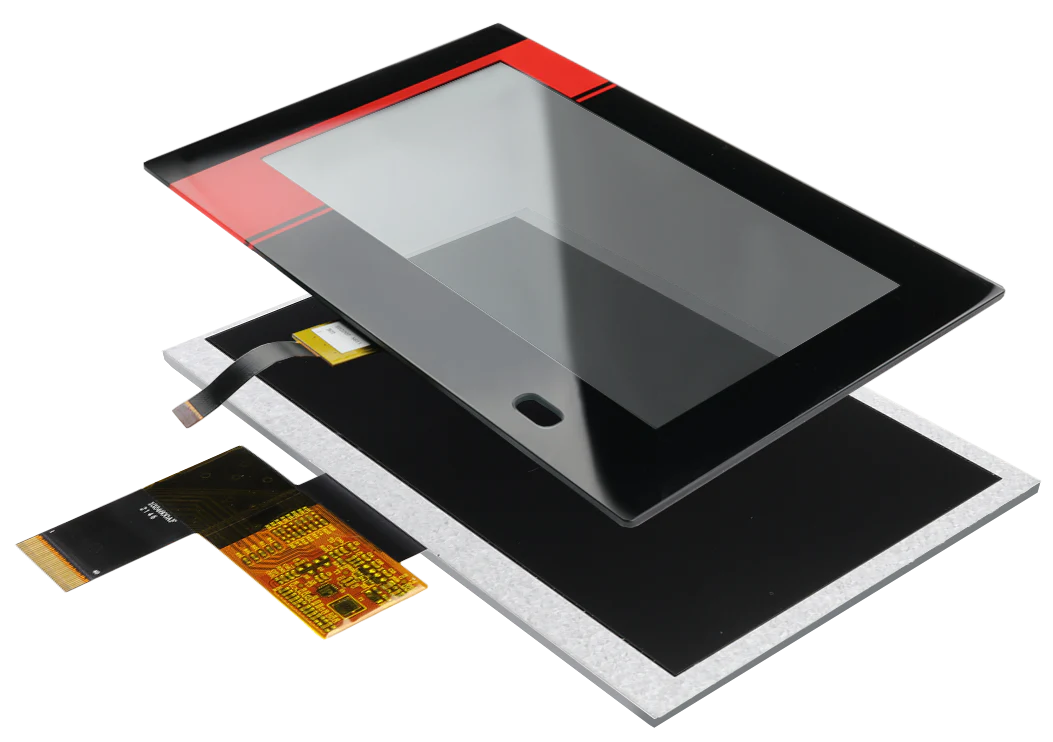
Capacitive (10-point touch, light transmittance ≥85%) suitable for consumer electronics; Resistive (256 levels of pressure sensitivity) suitable for industrial control; Full lamination reduces refl...
Hinterlasse einen Kommentar
Diese Website ist durch hCaptcha geschützt und es gelten die allgemeinen Geschäftsbedingungen und Datenschutzbestimmungen von hCaptcha.