









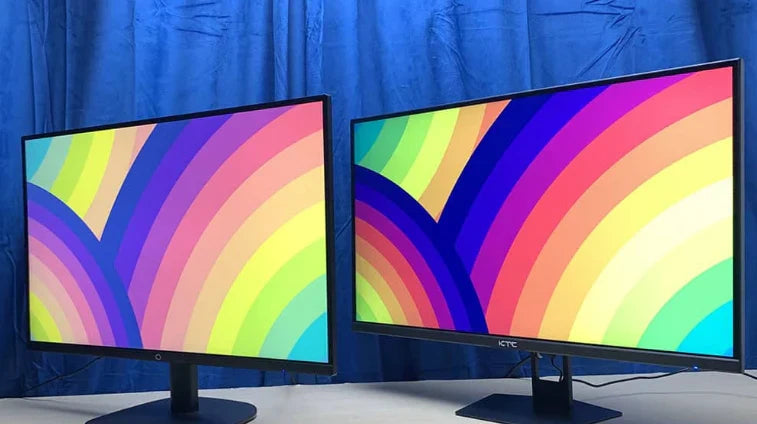
What Is an IPS Display | Response Time, Color Accuracy, Viewing Angles
IPS (In-Plane Switching) displays are widely recognized for their excellent color performance and viewing angles.
Compared to VA or TN panels, their advantage is a wide 178-degree viewing angle, with almost no color shift even when viewed from the side.
In terms of color, high-end IPS screens can cover close to 100% of the sRGB color gamut, providing realistic color reproduction.
The response time is typically around 5ms, which, while not the fastest for esports, is sufficient to balance daily use and gaming experience well.
Response Time
Response time measures the speed required for liquid crystal pixels to switch from one grayscale level to another, measured in milliseconds.
It is key to the clarity of dynamic images, directly determining whether fast-moving images will exhibit smearing.
Traditional IPS panels have response times between 5ms and 14ms, while modern Fast IPS technology, by optimizing liquid crystal materials, has reduced this value to 1ms GtG, rivaling TN panels while retaining the color advantages of IPS.
Measurement Standards
Gray-to-Gray (GtG):
GtG is the most widely adopted measurement standard in the industry. It measures the total time it takes for a liquid crystal pixel to transition from one specific grayscale level to another and then back to the initial grayscale level.
A complete GtG cycle includes:
-
Rise Time: The time required for the pixel to go from the initial grayscale (e.g., 10%) to the target grayscale (e.g., 90%).
-
Settle Time: The brief time the pixel remains stable at the target grayscale.
-
Fall Time: The time required for the pixel to return from the target grayscale to the initial grayscale.
Since there are hundreds of grayscale combinations, manufacturers typically test various combinations (e.g., 0→255, 127→255, 0→127, etc.) and use a representative best value for marketing.
This is why different monitor models with the same advertised "1ms GtG" specification may have different actual motion blur performance.
MPRT (Moving Picture Response Time):
MPRT is fundamentally different from GtG. It does not measure the physical switching speed of the pixel itself, but rather measures the length of the image persistence perceived by the human eye, caused by the duration the pixel remains lit on the screen.
-
Working Principle: Even if each frame is sharp, during the display time of a single frame, the pixel remains lit continuously. When our eyes track a fast-moving object on the screen, this continuous illumination creates a brief "trace" on the retina, manifesting as motion blur.
-
Relationship with Refresh Rate: MPRT is directly related to the refresh rate. Theoretically, the minimum MPRT for a 60Hz monitor is about 16.7ms (1000ms/60), while a 144Hz monitor can reduce it to about 6.94ms. Backlight strobing (technologies like ELMB, DyAc) can further shorten the effective pixel illumination time, thereby reducing MPRT and alleviating motion blur.
-
Important Distinction: A monitor can have a very fast GtG response time (e.g., 1ms), but if its MPRT value is high, you will still see noticeable motion blur. Conversely, by optimizing MPRT, even if the GtG response time is not the fastest, the subjective smoothness can be improved.
Black-to-White-to-Black (BTW):
BTW is an older measurement standard that measures the time it takes for a pixel to switch from pure black (0% brightness) to pure white (100% brightness) and back to pure black. This standard was more common in the early days of LCD development.
-
Limitations: BTW measures the extreme case of the fastest brightness change (black-white has the maximum contrast). In actual use, pixels mostly switch between different grayscale levels, which is slower than the black-white switch. Therefore, the BTW indicator is often overly optimistic and does not accurately reflect the monitor's true dynamic performance.
-
Current Status: Today, BTW has been largely replaced by GtG and is no longer a mainstream marketing metric, but it is still listed as reference data in some professional reviews.
Overdrive (Drive Acceleration) and Its Impact
To improve response speed, monitors are equipped with an Overdrive function. This technology applies a brief overshoot voltage to "push" the liquid crystal molecules to rotate faster.
-
Optimal Setting: The Overdrive intensity needs precise calibration. If the intensity is too low, the acceleration effect is not significant; if it is too high, it causes "overshoot" phenomenon.
-
Overshoot and Inverse Ghosting: When the voltage is too high, the liquid crystal molecules rotate past the target position and then correct back, creating an "inverse ghosting" or corona effect opposite to the direction of motion at the edges of moving objects, which also affects viewing.
-
Manufacturer Strategy: The "OD" levels provided by the monitor (e.g., "Off", "Weak", "Medium", "Strong") correspond to different voltage intensities. The manufacturer's advertised best response time (e.g., 1ms) is usually measured at the highest level, but that level may produce unacceptable overshoot.

IPS Panel Technology
How IPS Works:
When no voltage is applied, the liquid crystal molecules in an IPS panel remain in their initial state. After light passes through the lower polarizer, it is completely blocked by the upper polarizer, achieving pure black.
However, achieving high-contrast pure black was a challenge for early IPS.
When voltage is applied, all liquid crystal molecules rotate in the same plane, up to 90 degrees, changing the polarization direction of the light, allowing light of specific colors to pass through the color filter, ultimately displaying color.
This coordinated movement of molecules ensures that even when viewed from extreme angles, the light path and color performance remain highly consistent with the frontal view, which is difficult for TN and VA panels to achieve.
Evolution of IPS Technology
-
Early IPS (e.g., Super-IPS, 1996): Primarily solved the narrow viewing angle issue of mainstream TN panels at the time, but the response time was generally in the 40-50ms range, completely unsuitable for dynamic image display.
-
Advanced IPS (e.g., e-IPS, p-IPS, post-2009): By optimizing electrode design and liquid crystal materials, the response time was shortened to the practical range of 6ms to 12ms, and began to differentiate between professional and consumer markets. p-IPS provided higher color depth (8-bit+FRC or native 10-bit) for professional color workers.
-
Modern Mainstream IPS (e.g., AH-IPS, IPS-PRO): Further improved pixel density (PPI), color volume (DCI-P3 coverage), and light transmittance, making 2K, 4K high-resolution IPS monitors mainstream in the consumer market. Response time was further optimized to around 5ms.
-
High-Performance IPS (Fast IPS / Nano IPS): By using new liquid crystal compounds with low viscosity and pairing them with more efficient drive circuits, the native GtG response time was reduced to 1ms, rivaling TN panels in speed for the first time.
How Fast IPS Achieves the Speed Breakthrough
-
Low Viscosity Liquid Crystal Materials: The viscosity coefficient of new liquid crystal materials is significantly reduced, with lower molecular inertia, allowing faster startup and stop under voltage drive, fundamentally shortening the physical delay of pixel switching.
-
Optimized Voltage Control: Overdrive technology has become more refined and intelligent. By precisely controlling the intensity and duration of the voltage applied to the liquid crystal molecules, it provides the "just right" push for them to quickly reach the target position, while avoiding overshoot (inverse ghosting).
-
Panel Design and Manufacturing Process: More precise electrode design reduces signal delay, and thinner cell gaps mean liquid crystal molecules need to deflect over smaller angles and distances, all contributing to improved response speed.
Trade-offs and Challenges of IPS Technology
-
Contrast Ratio Bottleneck: Because the IPS structure requires liquid crystal molecules to remain parallel, its control over light is not as thorough as the vertical alignment of VA panels, making it difficult to completely avoid backlight leakage in dark scenes. Therefore, the static contrast ratio of mainstream IPS monitors is typically around 1000:1, while VA panels can easily reach 3000:1 to 5000:1.
-
Power Consumption and Cost: To achieve brightness levels similar to VA or TN panels, IPS panels may require higher backlight intensity to compensate for their relatively lower light transmittance, which slightly impacts power consumption. Meanwhile, more complex manufacturing processes also make their cost typically higher than TN panels of the same specification.
-
"IPS Glow": When displaying dark images, viewing from an angle may cause a whitish or purplish glow in the corners of the screen. This is caused by multiple reflections and refractions of light between the liquid crystal layer and polarizers, and is not a defect, but it can be noticeable when viewing dark content in low-light environments.
Market Positioning of IPS vs. Other Panel Types
-
TN Panel: Due to its extremely fast response speed and low cost, it still has a place in professional esports pursuing the ultimate frame rates, but its shortcomings in color and viewing angles have caused its market share in the general market to shrink sharply.
-
VA Panel: With its extremely high static contrast ratio, it has a unique advantage in scenarios requiring deep blacks (such as video entertainment, dark room gaming). Its response speed, especially the switching speed between grayscales, remains its main weakness, prone to black smearing in fast-paced games.
-
IPS Panel: By achieving a good balance between color accuracy, viewing angle stability, and response speed, it has become the absolute mainstream in the current market. Whether for daily office work, professional design, content consumption, or mainstream gaming, IPS provides the most comprehensive experience.
Synergistic Work
The Relationship Between Response Time and Refresh Rate:
We can use a simple analogy: imagine the monitor is quickly flipping through an animation book.
-
Refresh Rate (e.g., 144Hz): Determines how many pages can be flipped per second. 144Hz flips 144 pages per second, with each page staying for about 6.94 milliseconds. The higher the refresh rate, the smoother the animation and the weaker the tearing sensation.
-
Response Time (e.g., 5ms GtG): Determines how clear the pattern drawn on each page is. If the artist's hand is too slow (slow response time), and the pattern isn't finished before flipping to the next page, the pattern on that page will be blurry, causing motion blur and smearing.
Their synergy point is the "time window": The refresh rate sets a fixed time window (e.g., about 6.94ms at 144Hz). The response time must complete the pixel color switching within this time window to present a clear frame.
-
Ideal Situation: Response time (5ms) is much less than the refresh cycle (6.94ms). The pixel has ample time to complete the change and stabilize, and each displayed frame is sharp and clear.
-
Problematic Situation: If the response time (8ms) is longer than the refresh cycle (6.94ms). When the next frame arrives, the pixel has not yet reached the target color, the image from the previous frame will persist and overlap with the next frame, causing severe smearing.
The Role of Synchronization Technologies:
V-SYNC (Vertical Synchronization) is an early solution but introduces input lag and frame rate drops. The modern solution is adaptive synchronization technology:
-
NVIDIA G-SYNC and AMD FreeSync: These technologies dynamically match the monitor's refresh rate to the GPU's real-time frame output rate.
-
How It Works: When the GPU finishes calculating a frame, it sends a signal to a G-SYNC or FreeSync compatible monitor. The monitor waits for this signal and refreshes the screen immediately upon receiving it, rather than rigidly adhering to its nominal refresh cycle.
Synergistic Effect: The best results are achieved when adaptive sync technology, high refresh rate, and fast response time work together.
-
Adaptive Sync ensures frame delivery is smooth and tear-free.
-
High Refresh Rate provides the capacity for high frame rates, making motion pictures more fluid.
-
Fast Response Time ensures that each frame itself is clear.
Input Lag:
Response time, refresh rate, and synchronization technology collectively affect another experience metric: input lag. This is the total time from your action (e.g., clicking the mouse) to the action being displayed on the screen.
-
Higher refresh rate directly reduces lag: At 60Hz, each frame is displayed for about 16.7ms, your input needs to wait an average of about 8.3ms to be processed by the next frame. At 240Hz, each frame time is about 4.17ms, and the average waiting time is shortened to about 2ms.
-
Fast response time reduces pixel delay: The faster the pixel completes the color switch, the sooner the image can be presented in its correct form.
-
Impact of Synchronization Technology: Traditional V-SYNC significantly increases input lag. Modern adaptive sync technologies (G-SYNC/FreeSync) have a much smaller impact on input lag than V-SYNC while eliminating tearing.
For competitive gamers, pursuing a high refresh rate (240Hz or above), extremely fast response time (1ms GtG), and enabling adaptive sync is a systematic solution to achieve the lowest input lag and the best responsive experience.
Color Accuracy
Color accuracy refers to a display's ability to reproduce colors realistically, measured by the ΔE (Delta-E) value, which quantifies the deviation between the displayed color and the standard color.
A lower ΔE value indicates higher accuracy: when ΔE < 2, the color difference is imperceptible to the human eye, meeting professional standards; ΔE between 2-4 is excellent; while ΔE > 5 indicates a noticeable deviation.
Achieving high color accuracy relies on three pillars: a wide color gamut (e.g., 100% sRGB or 98% DCI-P3 coverage), higher color depth (8-bit or more to avoid color banding), and consistent color uniformity.
Meaning
The key metric is the ΔE (Delta-E) value
The ΔE value is a mathematical formula that calculates the perceived difference between two colors in human vision.
Its calculation is based on the CIELAB color space established by the International Commission on Illumination, which aims to model human visual perception of color.
-
ΔE < 1.5: The color difference is basically imperceptible to the human eye. If a monitor's factory calibration report shows an average ΔE < 1.5, it typically indicates quasi-professional or professional-grade quality.
-
ΔE between 2.0 and 3.0: The difference is extremely subtle and is generally considered excellent, suitable for most design and daily professional work.
-
ΔE between 3.0 and 5.0: The average person might notice a slight difference, especially when comparing side by side. Acceptable for general office work and entertainment.
-
ΔE > 5.0: There is a clear color deviation that affects the accurate judgment of image content.
It's important to understand that the ΔE value is usually reported as an average (ΔE average), but the maximum value (ΔE max) is equally important, as it reveals the maximum possible deviation of the monitor on specific colors.
Color accuracy is a systematic engineering challenge
-
Color Gamut is the Foundation
Color gamut defines the range of colors a device can display. Common standards include:
-
sRGB: The most basic standard designed for the web and general use. Covering 100% sRGB is the baseline for color accuracy.
-
Adobe RGB: Contains richer greens and cyans than sRGB, primarily aimed at professional photography and printing.
-
DCI-P3: Commonly used in digital cinema and high-quality media, capable of displaying more vibrant reds.
A monitor may have a wide DCI-P3 gamut, but if its color accuracy is low (i.e., high ΔE value), all the colors it displays will be vibrant but incorrect.
-
-
Color Depth Affects Smoothness
Color depth, or bit depth, determines the number of colors each pixel can display. It is usually expressed in bits:
-
8-bit: Can display about 16.7 million colors. This is the mainstream configuration for current IPS monitors, providing relatively smooth color gradients.
-
10-bit: Can display about 1.07 billion colors. High color depth greatly improves the smoothness of color gradient areas, effectively preventing ugly banding or stepping in areas like skies and shadows.
-
-
Gamma Curve and White Point
-
Gamma: Defines the monitor's brightness response curve. The standard gamma value is 2.2, ensuring that the brightness transition from black to white conforms to human perceptual habits. Deviation from this value can cause the image to appear too bright overall (low gamma) or too dark (high gamma).
-
White Point: Refers to the color temperature of the "pure white" defined by the monitor. The common standard is D65 (6500K), simulating the color of average daylight in the northern hemisphere. An incorrect white point causes the image to appear overall too cool (blue) or too warm (yellow).
-
Impact on Visual Experience
Screen flickering is a primary cause of eye strain
The dimming method of the screen backlight directly affects the tension of the eye muscles.
-
PWM (Pulse Width Modulation) Dimming: Many traditional monitors control brightness by rapidly switching the backlight on and off. At low brightness levels, the on/off intervals become longer. While the human eye cannot directly perceive this flickering, prolonged viewing causes the pupil muscles to constantly adjust, leading to headaches and dry eyes. PWM dimming with a frequency below 1250Hz is particularly unfriendly to sensitive individuals.
-
DC (Direct Current) Dimming or Flicker-Free Technology: Controls brightness directly by stabilizing the current, eliminating flickering at the source. If you need to read or code for long periods, choosing a monitor with this technology can significantly reduce visual fatigue.
Blue light output intensity is related to sleep quality
Short-wavelength blue light (wavelength between 415-455nm) emitted by LED backlights has high energy.
-
Physiological Impact: Research shows that exposure to blue light during the day helps maintain alertness, but excessive exposure at night can suppress melatonin secretion and disrupt the biological clock. A study published in the Journal of Applied Physiology found that participants who used light-emitting electronic devices before bed took an average of 10 minutes longer to fall asleep, and their melatonin secretion peak was delayed, compared to reading a printed book.
-
Software and Hardware Solutions: The "Night Light" or similar mode built into operating systems can reduce the color temperature via software, decreasing the proportion of blue light. More effective is hardware-level low blue light technology, which adjusts the phosphor formulation of the LED backlight chips to reduce harmful blue light while minimizing excessive yellow tint on the screen.
Ambient light reflection interferes with visual clarity
How the screen handles ambient light directly determines its usability in bright offices or near windows.
-
Glossy vs. Matte Screens: Glossy screens make colors appear vibrant but act like mirrors, clearly reflecting windows or lights behind you, causing distraction. Matte screens use a surface coating to scatter point light sources into diffuse reflections. While this slightly reduces color vibrancy, it greatly improves anti-glare capability.
-
Brightness is the Foundation of Anti-Reflection: In well-lit environments, screen brightness needs to be at least 300-400 nits to overpower reflected light and ensure content is clearly readable. When brightness is insufficient, you will unconsciously lean closer to the screen and squint, increasing eye muscle fatigue.
Text and edge clarity are determined by pixel-level details
This is related to resolution but not entirely equivalent.
-
Pixel Density (PPI): For a screen of the same size, a higher resolution means a higher PPI value, and the pixels are more densely packed. On a 28-inch monitor, 4K resolution (approx. 157 PPI) significantly reduces edge aliasing of icons and text compared to 2K resolution (approx. 105 PPI), providing a smoother, more print-like quality.
-
Sharpness and Oversharpening: Image processing algorithms attempting to enhance clarity may produce a "halo" effect, creating unnatural bright edges around objects.
Smoothness of dynamic images is determined by both response and refresh
-
Pixel Response Time (Gray-to-Gray): Refers to the time it takes for a pixel to change from one color to another, measured in milliseconds (ms). A slow response time (e.g., over 8ms) will cause smearing or ghosting in fast-moving images. For IPS panels, mainstream gaming monitors now achieve response times of 1ms (MPRT) or lower.
-
Refresh Rate (Hz): Refers to the number of times the screen refreshes the image per second. 60Hz is the base, refreshing every 16.7ms. Increasing to 120Hz or 144Hz shortens the refresh interval to 8.3ms or 6.9ms, respectively.
Color and Brightness Uniformity affect the overall consistency of the image
Even for monitors of the same model, there may be slight variations in brightness and color temperature across different areas of the screen.
-
Brightness Uniformity: Typically measured as a percentage of the brightness at the center (100%). A difference controlled within 10% is considered good. Exceeding 15% may result in noticeable "dark corners" or "bright spots" when working with uniform color blocks.
-
Color Uniformity: Refers to the consistency of color temperature when displaying the same gray across different areas of the screen. Poor color uniformity can cause one side of the screen to appear warm (yellowish) and the other side cool (bluish), which can be seriously misleading for photo editing or graphic design.
The realism of HDR effect depends on the brightness range and contrast ratio
HDR (High Dynamic Range) is not just about making the picture brighter.
-
Peak Brightness: A true HDR experience requires the monitor to achieve extremely high brightness when displaying light sources (like the sun, lights). VESA DisplayHDR 400 certification requires a peak brightness of at least 400 nits, while HDR1000 requires 1000 nits.
-
Contrast Ratio: HDR effects also rely on deep blacks. The static contrast ratio of traditional IPS panels is typically around 1000:1, while VA panels can reach 3000:1. OLED panels, due to their self-emissive pixel nature, can achieve contrast ratios in the millions to one.
IPS Panel Advantages
Viewing angles are the most prominent feature of IPS
Its liquid crystal molecules always rotate within a plane parallel to the screen, and regardless of the voltage applied, the ends of the molecules remain essentially anchored in their original positions.
-
Color and Brightness Consistency: When viewed from extreme angles (e.g., 178 degrees), the main change on an IPS screen is a natural reduction in overall contrast, but the hue and saturation remain highly stable. A calibrated sRGB color patch with a ΔE of 1.2 in the center of the screen might only increase to a ΔE of around 3.5 when viewed from a 60-degree side angle.
-
Practical Difference Compared to Other Technologies:
-
TN panels exhibit significant gamma shift and color cast when tilted beyond 30 degrees, with the upper and lower halves of the screen showing completely different brightness and colors.
-
VA panels, while having higher contrast, also show noticeable color shift and brightness attenuation when viewed from an angle. Their chromaticity change (ΔC) can be several times that of IPS panels.
-
Realism and depth of color reproduction
The horizontally aligned liquid crystal molecules allow for more precise control of the light passing through each sub-pixel, which lays the foundation for accurate color generation.
-
Native Color Advantage: IPS panels typically provide purer whites and more accurate primary colors (red, green, blue). This allows them to display colors closer to the standard definition when covering the same color gamut standard (e.g., sRGB).
-
Support for High Color Depth: Mainstream IPS monitors commonly use 8-bit color depth (16.7 million colors), achieving an 8-bit+2-bit dithering effect via FRC technology. High-end professional models are equipped with native 10-bit panels (1.07 billion colors), which is crucial for work requiring smooth gradients, such as photography and digital art, effectively eliminating color banding.
Image stability and compatibility with touch operation
Since the liquid crystal molecules do not make large vertical tilts, IPS panels have inherent stability when displaying static images.
-
Reduced Color Shift: When image content stays on the screen for a long time, it does not produce tiny brightness and color changes due to physical instability of the liquid crystal molecules. This reduces unnecessary interference for designers who need to focus on comparing colors and details for extended periods.
-
Resistance to Touch Pressure: When the screen surface is pressed (common in all-in-one PCs or touch-enabled monitors), the structure of the IPS panel's liquid crystal layer better maintains its shape, only showing a temporary, slight halo-like distortion that quickly recovers after the finger is released. In contrast, VA and other panels exhibit more pronounced and persistent water ripple-like distortion under pressure.
Evolution of response speed and dynamic image clarity
The response time (GtG) of early IPS panels was a weakness, but technological iterations have significantly improved this.
-
Performance of Modern IPS: By optimizing liquid crystal material formulations and drive voltages, the GtG response time of mainstream IPS gaming monitors has reached 1ms (MPRT) or low millisecond values (e.g., 4ms GtG).
-
Synergy with High Refresh Rates: The improvement in response time allows IPS panels to fully leverage the potential of high refresh rates (e.g., 144Hz, 240Hz, even 360Hz). High refresh technology reduces motion blur, making the edges of fast-moving objects clearer, which is crucial for first-person shooter games or racing simulators requiring quick reactions.
The table below compares the typical performance of IPS, TN, and VA panels in different application scenarios:
| Characteristic/Scenario | IPS Panel | TN Panel | VA Panel |
|---|---|---|---|
| Professional Design/Color Work | Accurate colors, wide viewing angles, industry preferred | Poor colors, narrow viewing angles, not suitable | High contrast, but color accuracy and viewing angle consistency inferior to IPS |
| Office/Web Browsing | Clear text, consistent colors from multiple angles | Poor viewing angles, inconvenient for collaboration | Good contrast, but slower response may cause smearing when scrolling text |
| Fast-Paced Competitive Gaming | High refresh rate + fast response, good colors | Fastest response speed, but sacrifices image color quality | Slowest response speed, may produce noticeable smearing |
| Video/Audio Entertainment | Realistic colors, wide viewing angles, suitable for multiple viewers | Viewing angles and colors are significant weaknesses | High contrast, deep blacks, strong performance in dark scenes |
Viewing Angles
Viewing angle refers to the maximum angle measured from the screen's center point at which an observer can obtain acceptable image quality.
The industry standard typically uses the point where the contrast ratio drops to 10:1 as the critical measurement point. Top-tier IPS panels can achieve ultra-wide viewing angles of 178°/178° (horizontal/vertical), meaning that within 89 degrees to the left and right, and 89 degrees up and down, the image quality does not degrade significantly.
Technical Principles
1. How are liquid crystal molecules arranged and how do they rotate?
-
IPS's "In-Plane Switching" Mechanism: IPS technology is named after its action. In the absence of voltage, the liquid crystal molecules in an IPS panel are horizontally aligned parallel to the screen. When voltage is applied, all liquid crystal molecules rotate synchronously within the same plane, up to a maximum of 90 degrees.
-
TN's "Twisted Nematic" Mechanism: The liquid crystal molecules in a TN panel are vertically twisted 90 degrees from the top substrate to the bottom substrate when no voltage is applied. When voltage is applied, the molecules gradually transition to a standing state perpendicular to the screen. The problem is that this movement from a "twisted lying" state to a "fully standing" state occurs in three-dimensional space. From the side, the effective path length and orientation of the molecules change drastically.
-
VA's "Vertical Alignment Tilt" Mechanism: VA panel molecules are aligned perpendicular to the screen when no voltage is applied, and tilt down when powered. Its viewing angle problem stems from the non-uniformity of the "pretilt angle". During manufacturing, a tiny initial tilt angle (pretilt) is set to ensure the molecules tilt in a predetermined direction under voltage. However, this pretilt is not perfectly uniform across the panel, leading to inconsistencies when viewed from the side.
2. How does the light path pass through the liquid crystal cell and polarizers?
-
The Role of Polarizers: LCD screens have upper and lower polarizers, whose polarization directions are usually perpendicular to each other. The backlight first passes through the lower polarizer, becoming light polarized in a single direction.
-
IPS's Optical Path Advantage: Because IPS molecules always rotate within a plane, their modulation of the polarized light's direction is relatively stable across different viewing angles. The direction of the liquid crystal molecules "experienced" by light entering at an oblique angle is not significantly different from that of light entering head-on.
-
The Light Leakage Problem of TN/VA: The three-dimensional movement of TN and VA molecules causes a significant difference in the polarization modulation of oblique light compared to frontal light. For example, at a certain side angle on a TN panel, a pixel designed to be off (black) may allow a significant amount of light to pass incorrectly through the upper polarizer due to insufficient or excessive rotation of the polarized light, turning black into gray, accompanied by strange colors. VA panels, when viewed from the side, also suffer from a severe drop in contrast due to gamma shift, as the transmittance of mid-tones changes.
3. Performance differences from a quantitative data perspective
Professional testing organizations can quantify this difference with precision instruments:
-
Contrast Ratio Attenuation Curve: When facing the screen directly (0-degree angle), a VA panel's static contrast ratio might be as high as 3000:1 or even 5000:1, far superior to the typical 1000:1 of an IPS panel. However, when the viewing angle shifts to just 20 degrees, the VA panel's contrast ratio may drop below 500:1. In contrast, an IPS panel can maintain its contrast ratio above 50% of its initial value (i.e., >500:1) within a 45-degree angle range, with a much flatter attenuation curve.
-
Color Difference (Delta-E) Change: Color difference Delta-E is an indicator measuring the degree of color deviation. A Delta-E > 3 indicates a perceptible color difference to the human eye; >5 indicates an obvious difference. Tests show that TN panels, when tilted 30 degrees, can have an average Delta-E value exceeding 10, showing severe color shift. Mainstream IPS panels, when tilted 45 degrees, typically keep the average Delta-E below 5, with high-end models (like LG's Nano-IPS, AUO's AHVA) controlling it below 3, ensuring relative color accuracy.
-
Gamma Curve Shift: The gamma value determines the grayscale transition from black to white. VA panels, when viewed from the side, exhibit an abnormal increase in the brightness of mid-tone grays (e.g., 50% gray), causing the image to appear washed out and lacking three-dimensionality. The gamma curve of IPS panels remains highly consistent across different viewing angles, with a shift typically less than 0.1, while the shift for VA panels can be as high as 0.5 or more.
4. Continuous technological evolution
To further improve viewing angles and response times, IPS technology is also evolving:
-
Fringe Field Switching (FFS) Technology: By optimizing the pixel electrode design, a stronger lateral electric field is generated, enabling faster rotation of liquid crystal molecules while improving uniformity within the viewing angle.
-
Polymer Stabilized Alignment (PSA): Adding a polymer network to the liquid crystal material helps the molecules return to their initial position faster and more accurately, improving response speed and reducing color shift at different viewing angles.
Performance of Different Panels
IPS Panel:
The design goal of the IPS panel is to maintain stable color and contrast over a wide angle.
Its liquid crystal molecules always rotate within a plane parallel to the screen. This mode of motion ensures the symmetry of the light path from a physical perspective.
When viewing an IPS screen from the side, the main change is a slight decrease in overall brightness.
At a 30-degree angle, the brightness may attenuate to about 75% of the frontal brightness; even at a 45-degree angle, it can usually remain above 50%.
More importantly, the attenuation curve of its color saturation is very gentle.
In professional tests, when using a standard color space (like sRGB), the average color difference (Delta-E) of an IPS panel within a 45-degree angle can usually be controlled below 3, making noticeable color shift difficult for the human eye to perceive.
For work requiring accurate color, such as photo editing or graphic design, this stability is essential.
Another indicator is the stability of the gamma curve. The gamma value describes the grayscale transition relationship from black to white.
IPS panels typically have a gamma shift of less than 0.1 across different viewing angles.
When viewed from the side, the 50% gray you see is still very close to 50% brightness, without becoming brighter or darker due to the viewing angle, thus ensuring the true reproduction of the image's tonal gradation.
A detail often overlooked is that IPS panels basically do not suffer from "black crush" or "grayscale inversion" when viewed from an angle.
VA panels show graying blacks when viewed from the side, while TN panels exhibit severe color inversion (e.g., light gray turning pink or green). IPS effectively avoids these problems.
VA Panel:
The advantage of VA panels lies in their extremely high native contrast ratio, typically reaching 3000:1 to 5000:1, which is three to five times that of IPS panels (1000:1).
This gives them purer blacks when displaying dark content, providing deeper blacks and a stronger sense of three-dimensionality when watching movies or playing games with many dark scenes.
The viewing angle problem of VA panels is mainly manifested as a sharp drop in contrast ratio and obvious graying of blacks.
Because their liquid crystal molecules are vertically aligned and tilt down, the path of light through the molecules changes significantly when viewed from the side.
Data shows that the contrast ratio of VA panels decays very rapidly: it might be as high as 4000:1 when viewed head-on, but when the viewing angle shifts to just 20 degrees, the contrast ratio may plummet below 800:1; at a 30-degree angle, it often drops to around 300:1, even lower than that of an IPS panel at the same angle.
Furthermore, the gamma shift of VA panels is more pronounced. When viewed from the side, the brightness of mid-tone grays (e.g., 25%-75% brightness) increases abnormally, causing the entire image to appear washed out and lacking contrast.
Color saturation also decreases significantly, making colors look dull and inaccurate.
For curved VA screens, although the curvature design aims to keep the eyes at the optimal viewing angle, for a user sitting in the center, the edges of the screen are actually at a side viewing angle, which may cause slight inconsistencies in color and brightness between the left/right edges and the central area.
TN Panel:
TN panels were once widely used in gaming monitors due to their low cost and extremely fast response time. But in terms of viewing angles, their performance is the worst, especially in the vertical direction.
The viewing angle problem of TN panels is not just a degradation of image quality, but involves severe "color inversion" and "contrast collapse." The three-dimensional twisting motion of their liquid crystal molecules causes severe distortion of the light path at side angles.
A typical characteristic is: when viewed from below the screen, the image darkens sharply or even turns completely black; when viewed from above, the image becomes severely washed out.
The horizontal viewing angle is also narrow; after shifting a certain angle, obvious color distortion occurs, for example, light backgrounds may turn yellowish, and dark areas may turn purplish.
In quantitative data, the color difference (Delta-E) of TN panels increases rapidly to over 10 when the viewing angle exceeds 20 degrees, making colors completely unrecognizable.
The contrast ratio also decays at a similar rate. Therefore, TN panels are almost only suitable for scenarios where the user faces the screen directly for long periods; any angular deviation leads to a significant drop in experience.
This is also why TN panels have been largely phased out in the professional design and general office fields.
Influencing Factors
How does the screen surface handle light?
-
The Diffusion Effect of Strong Anti-Glare (Matte Screen): Strong anti-glare coatings scatter ambient light by forming tiny, uneven textured bumps on the screen surface, thereby eliminating specular reflection. This textured structure also causes a slight diffuse reflection effect on the light emitted by the screen itself.
-
The Mirror Challenge of Glossy Screens: Glossy screens have very smooth surfaces with almost no diffuse reflection. This gives them extremely high contrast and color vibrancy when viewed head-on. However, their problems are magnified at side angles: first, the inherent viewing angle degradation of the panel itself (like IPS brightness drop, VA contrast collapse) is revealed without reservation; second, ambient light forms clear specular reflection hotspots on the smooth surface, and these hotspots cover a larger display area at side angles, further reducing readability.
What role do optical films play inside?
-
The Effect and Side Effect of Brightness Enhancement Films: Common brightness enhancement films, such as prism sheets (BEF), work by converging widely scattered light towards the frontal viewing angle.
-
Viewing Angle Compensation Film is a Specialized Solution: To directly improve viewing angles, high-end monitors use a special viewing angle compensation film. This film has complex optical anisotropy, and its function is to "correct" the phase retardation of light exiting the liquid crystal layer at wide angles. It can be thought of as an "optical prism" that redirects light that would otherwise "stray" to more reasonable exit angles. For VA panels, the compensation film can effectively suppress the contrast drop and gamma shift at side angles. Test data shows that for VA panels using high-quality compensation film, the contrast ratio attenuation rate at a 45-degree angle can be improved from 80% to within 60%.
How do drive circuits affect grayscale performance?
-
Accuracy of Gamma Voltage: Ideally, inputting a 50% grayscale signal should display exactly 50% brightness. This mapping relationship is determined by the gamma curve. The driver IC uses a set of gamma voltages to control the deflection degree of the liquid crystal molecules. If the accuracy of these voltages is poor, or their stability across different grayscales is inadequate, it causes gamma curve distortion. At side viewing angles, the panel's own optical response curve has already changed; if the drive voltage is imprecise at this point, it exacerbates the gamma shift, causing serious deviation in the display of mid-tone grays (e.g., 25%-75% brightness), making the image appear washed out or darkened.
-
Calibration of the Color Look-Up Table (LUT): Professional monitors support hardware calibration, the essence of which is to write the correction data from the calibrated color profile (e.g., ICC Profile) into the monitor's built-in LUT. Advanced calibration solutions allow for independent viewing angle compensation for different brightness levels (grayscales).
Structural design of the pixel itself
-
Fringe Field Switching (FFS) and Advanced Super Dimension Switch (ADS): In basic IPS, the pixel electrodes are in the same plane, and the electric field is lateral. More advanced Fringe Field Switching (FFS) or Advanced Super Dimension Switch (ADS) technologies (essentially enhanced branches of IPS) use more sophisticated electrode designs, such as interdigitated or layered electrode structures.
-
Parameters of the Liquid Crystal Material: The physical parameters of the liquid crystal material itself, such as birefringence, viscosity, dielectric anisotropy, etc., all affect its electro-optical response curve. Engineers can optimize the optical performance of the material under different voltages, temperatures, and viewing angles by formulating the liquid crystal mixture.
En lire plus
The core advantage of custom OLED lies in image quality. Its self-emitting pixels can achieve infinite contrast ratio and more vivid colors, but the cost is typically 30%-50% higher than TFT of the...
When selecting an IPS monitor, specifications should be determined based on the intended use. For professional design, models with 4K resolution and 99% sRGB/AdobeRGB color gamut coverage, such as ...
Laisser un commentaire
Ce site est protégé par hCaptcha, et la Politique de confidentialité et les Conditions de service de hCaptcha s’appliquent.