








TFT Display vs. IPS Display | Features, Performance, Price
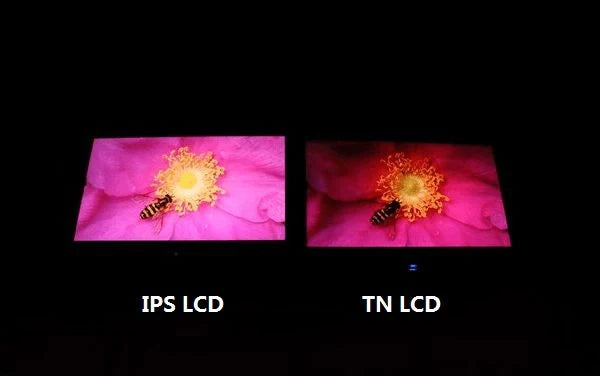
TFT is the overarching term for LCD driving technology, with IPS belonging to its wide-viewing-angle branch.
IPS characteristics: 178°/178° viewing angles, ΔE<2 color accuracy; performance-wise contrast ratio 1000:1+, response 5-8ms (superior to ordinary TFT's 600:1, 1-5ms but narrow viewing angles);
Price 20%-50% higher (e.g., 27-inch 1080P IPS approx. 110-170 vs TN 70-110), suitable for design/media.
Features
TFT (represented by TN panels) Vertically aligned liquid crystals, response 1-5ms, brightness 500-700 nits, but color gamut 70%-85% sRGB, viewing angle 160°, sides appear washed out;
IPS Horizontally rotating liquid crystals, response 4-12ms (now optimized to 4-5ms), brightness 300-500 nits, color gamut 95%-130% sRGB, viewing angle 178°+, HDR contrast up to 100,000:1.
Additional properties: TFT power consumption 10%-20% lower, lifespan 3-5 years; IPS lifespan 5-7 years, temperature resistant -0℃ to 50℃, TFT suitable -20℃ to 60℃.
Principle Differences
How liquid crystal molecules align:
-
TFT (represented by TN panels): Liquid crystal molecules default to vertical standing (long axis parallel to substrate), arranged in a 90-degree twist (Twisted Nematic) when unpowered. In this state, the upper and lower substrate polarizers are crossed at 90 degrees.
Data: TN panel LC twist angle strictly 90 degrees (error ±2 degrees), transmittance approx. 5%-7% (DisplayMate test), molecular spacing 0.3-0.5 μm (varies with temperature).
-
IPS: Liquid crystal molecules default to horizontal lying (long axis parallel to substrate), arranged in a "straight line" when unpowered. When powered, molecules rotate within the same plane (In-Plane Switching), rotation angle up to 0-180 degrees (e.g., LG Nano IPS max 170 degrees).
Where electrodes apply force:
-
TFT (TN panel): Electrodes placed on upper and lower glass substrates (vertical electric field). Upper substrate has color filter, lower substrate has TFT array, LC layer sandwiched between (thickness 2-4 μm).
-
IPS: Electrodes integrated on same substrate (horizontal electric field). Lower substrate contains both TFT array and transparent electrodes (e.g., ITO), upper substrate only for support.
How light travels:
-
TN panel: Light passes vertically through LC layer (path length = panel thickness, e.g., 2mm), twisted 90 degrees, passes through second polarizer.
-
IPS: Light passes diagonally through LC layer (molecules rotate horizontally, light path extended ~1.5x, e.g., 3mm), but horizontal field makes molecules rotate synchronously, polarization direction always parallel to electrodes.
The secret to response speed:
-
TN panel: Molecules twist 90 degrees from vertical, only need to overcome weak van der Waals forces, low resistance. Can complete 90-degree twist within 1ms (GTG gray-to-gray response), suitable for 120Hz+ refresh rates.
-
IPS: Molecules rotate from 0 to 170 degrees horizontally, need to overcome stronger intermolecular forces (horizontal alignment more densely packed). Early IPS molecular rotation slow, 8-12ms for one rotation.
How backlight cooperates:
-
TN panel: Vertically twisted molecules act like "light guides", efficiently directing light vertically, backlight utilization ~75% (more power efficient at same brightness).
-
IPS: Horizontally rotating molecules cause more light scattering (like frosted glass), backlight utilization only 60%-65%, requires higher power backlight to match TN brightness.
Display Characteristics
Are colors good-looking and accurate?
-
Color gamut coverage: IPS has inherent advantage. Mainstream IPS panels support sRGB 95%-130%, DCI-P3 85%-100% (cinema industry standard), Adobe RGB 80%-90% (printing design). E.g., LG UltraFine 32UN880-B (IPS) covers DCI-P3 98%, close to professional cinema screen; Dell U3223QE (IPS) achieves sRGB 100%, Adobe RGB 89%. TFT (mainly TN) basic gamut sRGB 70%-85%, even with quantum dot tech (e.g., Samsung C24FG73FQN, TFT QLED), max sRGB 125%, but color transitions abrupt, reds tend to orange.
-
Color accuracy: Measured by ΔE (smaller value more accurate). IPS professional models ΔE <2 (indistinguishable to human eye), e.g., Eizo ColorEdge CG2730 (IPS) ΔE 1.5; ordinary IPS ΔE 2-3 (sufficient for daily use). TFT TN panels generally ΔE 3-5, photo editing skin tones tend red (e.g., Asus VP249QGR, TFT TN, ΔE 4.2).
-
Color depth: Both support 8-bit (16.77 million colors) or 10-bit (1.07 billion colors), but IPS 10-bit panel share higher (e.g., LG 27GP950, IPS 10-bit), gradient skies have fewer banding.
How bright, how distinct black/white?
-
Max brightness: TFT TN panels rely on thin backlight stacks, typical 500-700 nits (e.g., Asus ROG Strix XG258Q, TFT TN, 600 nits), visible outdoors in sunlight. IPS due to thicker LC layer, higher light loss, base brightness 300-500 nits (e.g., Apple Pro Display XDR, IPS Mini-LED, typical 500 nits), but HDR mode local peaks 1000-1600 nits (e.g., Samsung Odyssey Neo G9, IPS Mini-LED, peak 2000 nits).
-
Contrast ratio: Static contrast (full-screen fixed) TFT TN ~1000:1 (e.g., Acer KG251Q, TFT TN), IPS ~1500:1 (e.g., BenQ PD2725U, IPS). Dynamic contrast (HDR local dimming) IPS advantage clear, e.g., Sony INZONE M9 (IPS) dynamic contrast 100,000:1, dark area star details preserved; TFT TN dynamic contrast only 5000:1, dark scenes tend gray.
Do colors change when viewed from the side?
-
IPS: Horizontal/vertical viewing angles 178°+, measured at 60 degrees side viewing, sRGB gamut maintained >95% (RTINGS data), brightness attenuation <10%. E.g., LG 27UL850-W (IPS), watching movie characters from side, skin tones no obvious yellow shift.
-
TFT TN panel: Viewing angle limit 160°, 30-degree side offset causes issues – color saturation drops 40%+ (e.g., red becomes pink, blue becomes purple), brightness attenuation 50% (DisplayMate test). Typical example ViewSonic XG2405 (TFT TN), viewing Excel spreadsheet numbers from side, edges blurry.
Motion blur?
-
TFT TN panel: LC molecules vertical twist low resistance, GTG response 1-5 ms. E.g., Asus ROG Swift PG259QN (TFT TN), 280 Hz refresh rate, response 1 ms, playing CS2 quick turns no ghosting.
-
IPS: Early molecular horizontal rotation slow, GTG 8-12 ms (e.g., 2015 LG 27UD88, IPS, response 12 ms), images prone to blur. Recent Fast IPS tech (e.g., LG Nano IPS, AUO Fast Liquid Crystal) adds fluoride to reduce viscosity, GTG reduced to 4-5 ms. E.g., Acer Nitro XV272U (Fast IPS), 170 Hz refresh rate, response 4 ms, playing Cyberpunk 2077 high-speed driving, no obvious motion blur.
Performance
TFT (primarily TN panels) performance focuses on response speed, native 1 ms GTG reduces motion blur in fast scenes;
But color gamut only sRGB 90-100%, viewing angles <45° show color shift.
IPS core features 99%+ sRGB wide gamut, 180° viewing angles, traditional response 4-8 ms GTG, modern high-end models achieve 1 ms MPRT/GTG, balancing speed and color, suitable for multi-scenario.
Response Time
What exactly is being measured in response time?
GTG (Gray-to-Gray) measures actual pixel transition time from one gray level to another, unit milliseconds (ms), smaller value means faster pixel reaction.
MPRT (Moving Picture Response Time) relies on black frame insertion to reduce visual persistence, making eyes perceive "no blur", but pixels aren't actually faster.
E.g., an IPS panel labeled 1 ms MPRT, actual GTG may be 3-5 ms; while TN panel labeled 1 ms GTG means pixels truly switch within 1 ms.
Buying monitor, prioritize GTG, MPRT only auxiliary.
Why is TN panel inherently fast?
When powered, molecules quickly twist to align with light source, when unpowered, restore original state, this process itself short duration.
Entry-level TN panel GTG ~2-5 ms, high-end gaming TN (e.g., Asus ROG Swift PG259QN) can push to 0.5 ms GTG.
How does IPS catch up to TN speed?
IPS (In-Plane Switching) panel LC molecules parallel alignment, good color and viewing angles, but molecular rotation slow, traditional GTG 4-8 ms.
Later manufacturers added Overdrive technology: Apply extra voltage to pixels, forcibly accelerate molecular rotation, at cost of potential overshoot (colors briefly over-bright).
E.g., LG 27GP850 IPS, Overdrive set to "High", GTG reduces from 5 ms to 1 ms;
Samsung Odyssey G7 IPS version, default GTG 1 ms MPRT, manually switch to "Fast Liquid Crystal" mode achieves 1 ms GTG.
But Overdrive too aggressive causes "inverse ghosting" (previous frame shadow remains), need to find balance.
In actual games, difference between 1 ms and 5 ms?
Playing Apex Legends 180° turn, 1 ms GTG TN screen (e.g., BenQ ZOWIE XL2546K) almost no motion blur, enemy outlines clear;
5 ms GTG ordinary IPS (e.g., Dell S2721DGF), fast movement gun edges have 2-3 pixel wide blur band.
Rocket League ball flight, FIFA 23 player sprint, 1 ms GTG blur length <1 pixel, 5 ms GTG can reach 5 pixels, ball or player trajectory like "with tail".
But at low frame rates (e.g., 60 Hz), 5 ms response time blur amplified by low refresh, then 1 ms advantage noticeable.
Response time vs refresh rate, which affects smoothness more?
240 Hz refresh rate with 1 ms GTG, each frame stays 4.17 ms, pixels switched early, frames coherent;
144 Hz refresh rate with 5 ms GTG, each frame stays 6.94 ms, pixels still switching, slight motion blur occurs.
Measured data: At 240 Hz, 1 ms vs 5 ms response time blur difference hard for human eye to detect; at 144 Hz, 5 ms blur 30% longer than 1 ms.
So high refresh (≥165 Hz) prioritize 1 ms GTG, low refresh (≤120 Hz) response time less impactful.
Response time tuning differences between brands
Asus ROG gaming TN screens (e.g., PG258Q) Overdrive conservative, avoid inverse ghosting, labeled 1 ms GTG but actual 2 ms;
Acer Predator XB253Q GX (TN) Overdrive aggressive, GTG 0.5 ms but occasional overshoot.
In IPS, LG UltraGear series Overdrive algorithm mature, 1 ms GTG stable;
Philips 275M1RZ (IPS) labeled 1 ms MPRT, GTG actual 3 ms, suitable for non-competitive gamers.
Hidden impacts beyond response time:
Besides motion blur, slow response can cause ghosting (previous frame remnant) and color artifacts.
E.g., TN panel black-to-white GTG 1 ms, but white-to-black may be 5 ms, rapid black-white switching (e.g., Dark Souls shadow scenes) causes gray trailing.
IPS via optimized LC materials (e.g., Fujitsu FFS technology), makes gray level transitions more uniform, artifacts less than TN.
|
Panel Type
|
Typical GTG Range
|
Overdrive Effect
|
Example Models (International Brands)
|
Suitable Scenarios
|
|---|---|---|---|---|
|
TN
|
0.5-5 ms
|
Aggressive tuning can reduce 0.5 ms
|
BenQ ZOWIE XL2546K (0.5 ms)
|
Competitive Gaming (>240 Hz)
|
|
IPS
|
1-8 ms
|
High setting reduces 3-5 ms
|
LG 27GP850 (1 ms GTG Overdrive)
|
General Gaming (144-240 Hz)
|
|
VA
|
4-12 ms
|
Limited effect, focus on contrast
|
Samsung Odyssey G9 (VA, 4 ms GTG)
|
Single-player AAA (non-extreme)
|
Testing response time, don't trust spec sheets, check professional reviews (RTINGS, TFTCentral) for gray level transition curves.
E.g., an IPS labeled 1 ms GTG, measured 10% gray to 90% gray takes 3 ms, then high-speed scenes still slow.
Response time is the "speed floor", choose correctly, dynamic scenes keep up with hand speed.
Color Performance
Color Gamut Coverage:
Color gamut is the "foundation" of color performance, refers to the range of colors a display can reproduce, commonly measured by sRGB, DCI-P3, Adobe RGB standards.
-
sRGB: TN panel sRGB coverage typically 90-100%, e.g., Asus VG248QE TN screen claims 98% sRGB; IPS panels generally 99%+, high-end like Dell U2723QE IPS achieves 99.7% sRGB, Apple Pro Display XDR IPS even covers 100% sRGB.
-
DCI-P3: Wide color gamut standard for movies, streaming (Netflix, Disney+), 25% more colors than sRGB. Entry-level IPS DCI-P3 ~85%, e.g., LG 27UP850; high-end like Eizo ColorEdge CG279X IPS achieves 98% DCI-P3, Samsung Odyssey Neo G8 IPS version claims 95% DCI-P3. TN panels DCI-P3 generally <75%, e.g., Acer Predator XB273K TN screen only 72%.
-
Adobe RGB: Industry standard for printing, professional photography, coverage 35% wider than sRGB. Only few high-end IPS support, e.g., Eizo CG319X IPS claims 99% Adobe RGB, NEC PA311D IPS achieves 98%, TN and VA panels basically don't advertise this parameter.
Viewing ordinary sRGB content (e.g., web), 99% vs 100% sRGB no difference;
But playing DCI-P3 movies, 85% coverage loses some red/green hues, e.g., flame edges appear grayish.
Color Accuracy:
ΔE <1: Professional grade, human eye can't distinguish deviation; ΔE 1-2: Excellent, suitable for photo editing; ΔE 2-5: Acceptable, fine for daily use; ΔE >5: Visibly off-color.
-
TN panels: LC molecule arrangement causes color shift, ΔE generally >5. E.g., Asus VG278QR TN screen measured ΔE 6.2, reds lean orange, blues lean purple, photo editing skin tones become reddish.
-
IPS panels: Molecule parallel alignment uniform color, ΔE easier to lower. Entry-level like Philips 275M1RZ IPS claims ΔE <2, measured 1.8; high-end like Eizo CG279X IPS factory calibrated ΔE <0.9, each unit includes report.
-
Calibration impact: Uncalibrated IPS ΔE may be 3-4, using colorimeter (X-Rite i1Display Pro) calibration can reduce to below 1. TN panel calibration at best reduces to 3-4, still inferior to IPS.
Real example: Editing sunset photo on ΔE 6 TN screen, sun's orange-red appears dull; ΔE 1 IPS screen can reproduce sunset's warm tone gradation.
Color Transitions:
Color transitions judged by gray levels (midtones black to white) and gradients (e.g., sky blue to purple) smoothness, banding affects image detail.
-
TN panels: Gray level transitions often show "banding jumps", e.g., 20% gray to 30% gray suddenly brightens, dark detail lost. Measured 256 gray levels, TN average banding 3-5 locations, concentrated in 10%-30% dark region.
-
IPS panels: Gray level transitions more continuous, high-end like LG 27GP950 IPS uses Nano IPS panel, 256 gray levels banding <1 location. Gradient test, IPS blue to purple transition width ~5 pixels, TN screen 15 pixels, visible stripes.
HDR content demands higher transition quality. IPS dynamic contrast (via local dimming) makes bright (sunlight) and dark (shadow) transitions natural;
TN static contrast low (600:1), HDR brights overexposed, darks crushed, gradient banding more obvious.
Contrast Ratio:
Contrast ratio = white brightness / black brightness, higher value, black purer, colors more layered.
-
TN panels: Static contrast 600:1-1000:1, blacks appear grayish. E.g., Asus VG248QE TN screen, full black brightness 5 nits, contrast 800:1, viewing night sky photo stars appear foggy.
-
IPS panels: Static contrast 1000:1-1500:1, blacks deeper. Dell U2723QE IPS contrast 1300:1, full black brightness 3 nits, same night sky photo shows more star detail.
-
Mini-LED IPS: High-end solution uses hundreds of local dimming zones, dynamic contrast up to 1,000,000:1. E.g., Apple Pro Display XDR, local dimming black brightness 0.5 nits, watching Dune desert night scene, sand grain texture clear under moonlight.
E.g., IPS contrast 1300:1, red saturation 15% higher than TN (800:1), appears more vibrant but not glaring.
Color needs differences across scenarios
-
Gaming: Color accuracy less critical, TN sRGB 98%+ sufficient, focus on response speed. But games like Cyberpunk 2077, IPS wide gamut makes neon lights more vibrant.
-
Photo editing: Require 99% Adobe RGB or 95% DCI-P3, ΔE <2, IPS only choice. Editing RAW photos on TN, exported photos show skin tones yellowish.
-
Video post-production: DCI-P3 coverage >90%, ΔE <1.5, IPS or OLED. E.g., Final Cut Pro color grading, IPS screen accurately reproduces director's intended "teal and orange" look.
-
General office: sRGB 99%+ IPS sufficient, viewing documents, videos colors comfortable, wide viewing angles for sharing no color shift.
How to interpret manufacturer color specs?
-
Don't trust vague "wide color gamut", ask specifics: sRGB 99% or DCI-P3 85%?
-
ΔE value check "factory calibrated" or "typical": Factory calibrated (e.g., Eizo) more reliable, typical may be uncalibrated state.
-
Check professional reviews (RTINGS, TFTCentral) gamut measurement charts: Some screens claim 99% sRGB, actual only 95%, missing high-saturation reds.
Price
TFT (including TN/VA) and IPS monitor price gap significant: 23.8-inch base models, TN screen approx. 105 (e.g., Dell E2423HN), IPS screen approx. 140 (Dell S2421HS), 33% difference.
Same size 27-inch 2K IPS 25%-40% more expensive than TN, due to IPS yield 70%-85% (TN >90%), more complex backlight.
Professional 4K IPS design screens exceed $420 (e.g., Eizo ColorEdge), TN/VA alternatives 30% lower.
Price Tiers
How to pick cheap models:
Dell E2423HN price 105, AOC 24B1XH 110, LG 24MK400H as low as $95.
All three use 6-bit dithering to simulate 8-bit color depth, sRGB coverage 72%-85%.
27-inch 1080p IPS entry-level (Acer R271, 115) etc. TN flat panels 15 less.
Cost reduction points:
-
Plastic frame share >80% (metal frame models $20+ more)
-
60 Hz refresh rate saves timing controller cost
-
No built-in speakers (saves 8-12 component cost)
Mainstream battleground:
24-inch 2K IPS (2560x1440) starting 195 (AOC Q24G2), 25% more expensive than same spec TN (Acer Nitro XV0, 155).
27-inch 4K IPS (Dell S2721QS, 230) vs AOC 27B1H (160), 43% difference.
Premium justification breakdown:
|
Component
|
TN Cost Share
|
IPS Cost Share
|
Price Difference Source
|
|---|---|---|---|
|
LC Panel
|
$45
|
$65
|
Horizontal alignment process complex
|
|
Backlight Module
|
$22
|
$28
|
Light guide plate precision higher
|
|
Driver IC
|
$8
|
$12
|
Needs to handle wider gamut signals
|
|
Assembly/Testing
|
$10
|
$15
|
Lower yield increases rework cost
|
Where gamers' money goes
AOC 24G2U (23.8-inch) sells for $180, response time 1 ms GTG.
Same size IPS requires Fast IPS tech to match speed: ASUS VG249Q1A sells for $220, 22% price difference.
High-refresh model price gradient:
-
144 Hz TN: 150-190 (MSI Optix G241)
-
165 Hz Fast IPS: 230-280 (LG 27GL83A)
-
240 Hz IPS: $320+ (BenQ ZOWIE XL2546K)
Why designers pay three times more
Eizo ColorEdge CS2740 (27-inch 4K) sells for $1,050, ΔE <1.5 and CalMAN certified.
Same size consumer IPS (Dell U2723QE) $610, ΔE≈2.
Cost composition difference:
-
10-bit panel cost increase $80 (vs 8-bit)
-
Hardware calibration engine (X-Rite integrated) premium $120
-
Uniformity compensation tech (reduces backlight bleed) cost $50
Curved screen price magic
Samsung Odyssey G7 (27-inch 1000R) sells for 390, 25% cheaper than same spec IPS curved (Alienware AW2723DF, 520).
Curvature cost only 15% of price difference, main discount from panel purchase scale effect.
Three signals for future price easing
-
Panel overcapacity: BOE 27-inch IPS panel quote down to 55 (2023 Q4), pushing retail below 140
-
Tech iteration: Oxide backplane yield improved to 88%, narrowing gap with TN
-
Channel change: Dell direct-sell models 18% lower than retail (e.g., S2721QS official 250 vs Best Buy 305)
Price Differences
Panel manufacturing differences, where cost differs
TN panel LC molecules vertical alignment, like stacked books, simple process, 23.8-inch panel cost ~$45 (e.g., TN screen in AOC 24B1XH);
IPS molecules horizontal rotation, like spread plates, require precise electrode control, same size cost $65 (IPS screen in LG 24QP500), 44% more expensive.
VA panel between, molecules wedge-shaped alignment, 27-inch cost $50 (Samsung C27F396), 11% higher than TN, 23% lower than IPS.
Backlight modules also graded: TN uses ordinary light guide plate, cost 22; IPS needs micro-lens light guide for uniformity, cost 28; VA due to high contrast needs, extra backlight film layer, cost $25.
How yield directly affects sticker price
TN panel mass production yield >90%, 100 panels yield 90 good, unit cost 45; IPS yield 70%-85%, unit cost 76 (65 panel price ÷ 0.85 yield).
Early IPS yield only 60%, unit cost 108, 140% more expensive than TN.
Case: 2022 Dell S2721DS (27-inch IPS) due to yield fluctuation, price rose from 280 to 310, 11% increase; same period same size TN AOC 27B1H due to stable yield, maintained $160.
Good color and viewing angles, how much extra?
TN side view 60° washes out, IPS uses dual-domain pixel tech to counteract color shift, driver IC cost from 8 to 12 (e.g., IPS driver IC in ASUS VP249QGR).
Color-wise, TN 6-bit dithering to 8-bit, IPS native 8-bit+10-bit gradient, 10-bit panel $30 more expensive than 8-bit.
Gamut coverage premium breakdown:
-
sRGB 99% (IPS base): +$15
-
DCI-P3 90% (cinema-grade): +$35 (e.g., IPS screen in BenQ SW271)
-
Adobe RGB 99% (print-grade): +$60 (Eizo CG2730)
Gaming and design scenarios, why bigger price gap
Gaming field, TN excels with 1 ms GTG response, 24-inch 240 Hz TN screen (AOC 24G2U) sells for $180;
Same spec Fast IPS (ASUS VG249Q1A) requires 220, 22% difference from response chip upgrade (10) + panel cost ($30).
Design field, professional IPS premium heavier. 27-inch 4K IPS (ΔE <2) like Eizo ColorEdge CS2740 sells for 1,050, same size consumer IPS (Dell U2723QE) 610, difference $440.
Hardware calibration engine (120), 10-bit LUT (80), uniformity compensation ($50) account for 52% of premium.
Curved screen price trick
Samsung Odyssey G7 (27-inch 1000R) sells for 390, same spec IPS curved (Alienware AW2723DF) 520, 25% difference.
Curvature itself cost only 5 (mold fee allocation), main discount from VA panel purchase volume (annual capacity over 50 million) diluting cost, 15 cheaper than same spec IPS panel.
Read more
Industrial-grade LCD testing: Environmental simulation includes operation at -40℃ to 85℃, IP67 protection, and 95% humidity without condensation; performance testing includes brightness of 500-1500...

Recommend 2.4-inch ILI9341 TFT screen (240×320), SPI interface saves pins, paired with TFT_eSPI library. After installing the library, call tft.init() to initialize. Compatible with all Arduino ser...
Leave a comment
This site is protected by hCaptcha and the hCaptcha Privacy Policy and Terms of Service apply.